Billing, Invoicing & Claims

Clinic billing that carries the payer, invoice and claim through one connected flow.

Invoices, payer splits, contracted pricing, deposits and claims, linked to the visit from booking to final bill. LHDN e-Invoice ready.

From booking to final bill

Money moves before, during and after the visit.

Deposits, patient balances, payer amounts and claims stay attached to the same appointment and visit.

  1. 01Book & depositCollect a deposit or full payment online.
  2. 02Bill the visitItems flow in from the consultation.
  3. 03Split the payerCovered amounts apart from co-pay.
  4. 04Claim or collectSubmit to the payer or take payment.
  5. 05Send & e-InvoicePDF, portal and LHDN-ready fields.
One billing module

Every way a clinic gets paid, in one place.

Invoices from the right template

Cash, insurer, panel or TPA layouts, pre-filled from the visit.

Payer and patient, kept apart

Covered items, co-pay and non-claimable lines split automatically.

LHDN e-Invoice ready

Tax, payer and line-item fields structured in every bill.

Deposits carried into the bill

What was paid online shows up, so only the balance is due.

Send it anywhere

Email, WhatsApp, print or the patient portal, straight from billing.

Invoices in the patient portal

Patients see invoices, status and receipts without calling the clinic.
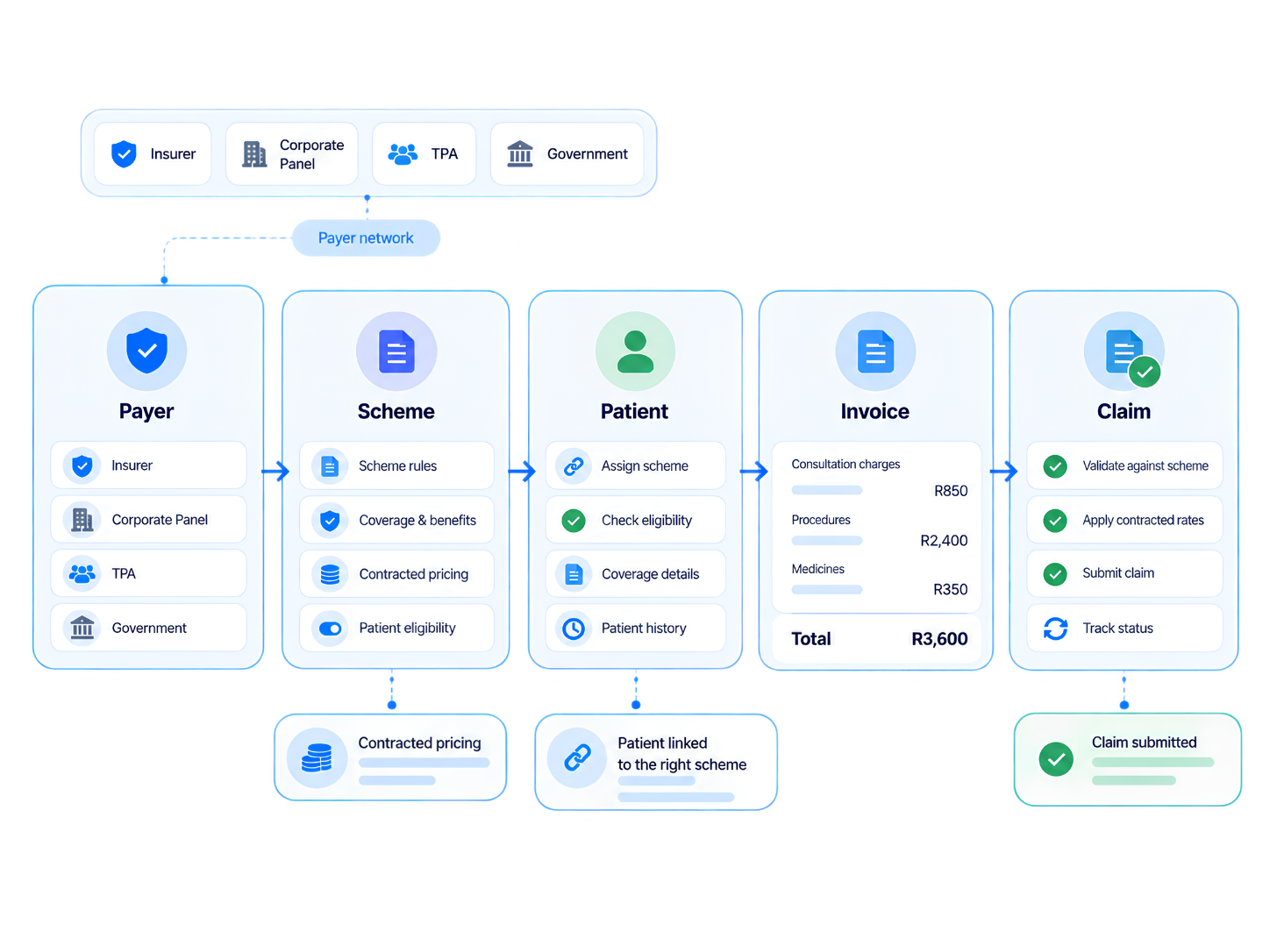
Relify claims and payer management workflow
Claims & payer management

Set up the payer once. Use it on every invoice and claim.

Add insurers, corporate panels, TPAs and government programmes, organise their schemes, and attach the right one to each patient.
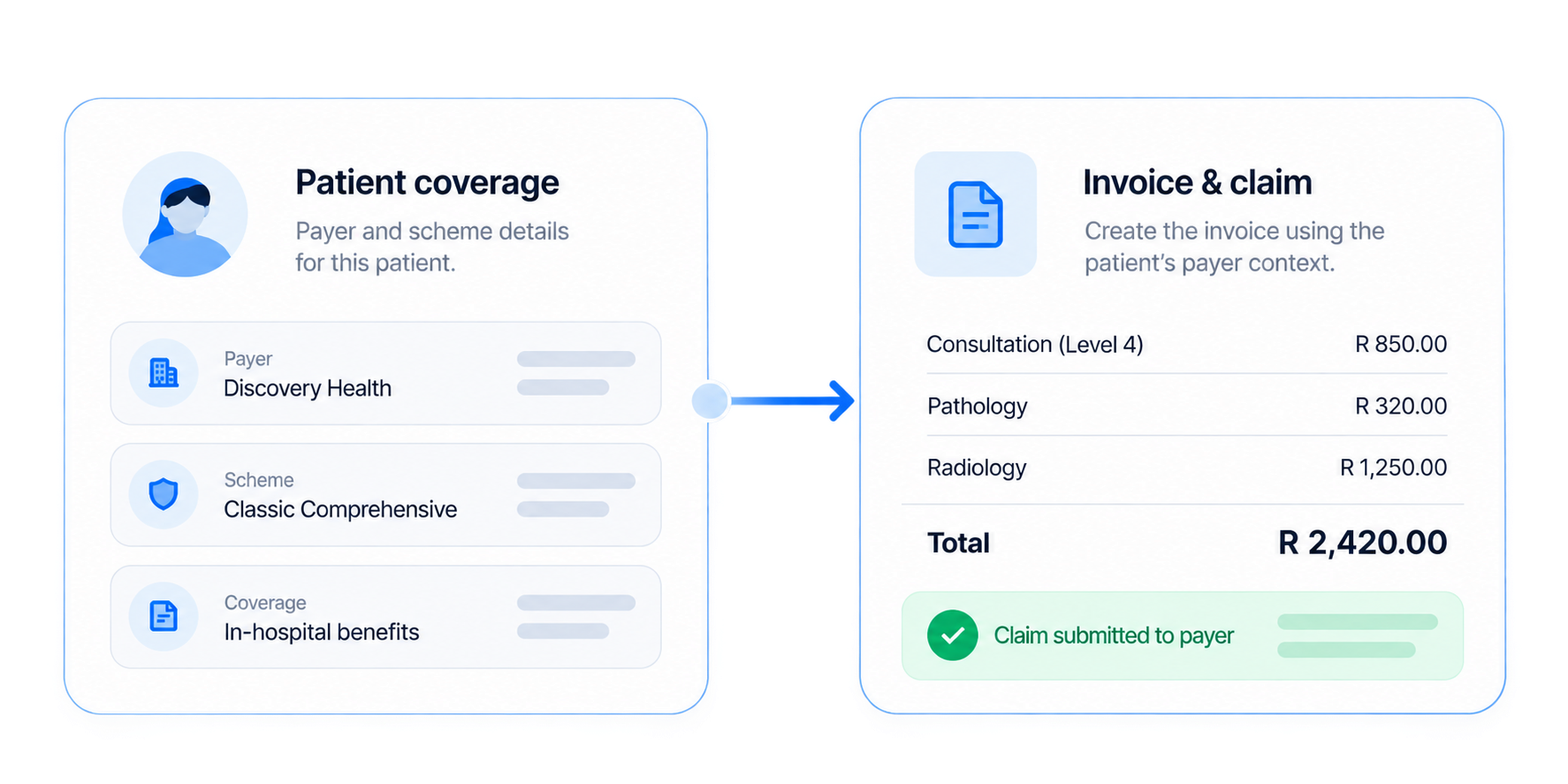
  • Every payer typeInsurer, corporate, TPA and government records with their schemes underneath.
  • Schemes built around real contractsDifferent patient rules and pricing per scheme, not one list per payer.
  • Coverage visible at billingAttach the scheme to the patient once; staff stop asking at every visit.
Relify payer-specific contracted pricing workflow
Contracted pricing

A payer price, without changing everyone else’s.

Keep the clinic’s normal selling price, and set the contracted price that applies only to patients on that payer and scheme.

  • Default price stays intactSelf-pay and other payers keep the normal inventory price.
  • Payer-specific overridesNo duplicated inventory items.
  • Applied automaticallyThe patient’s scheme picks the right price at billing.
Defined once

The payer follows the patient all the way to the claim.

  1. PayerInsurer, panel, TPA or programme
  2. SchemeContract rules
  3. PatientCoverage attached
  4. PriceContracted overrides
  5. Invoice or claimReady to bill
Different billing paths

Pick the route for the visit, not a different system.

Create invoiceCash template, visit items pulled in.
Collect paymentCash, card, transfer, QR or mixed.
Send & archivePDF, email or the patient portal.
5 payer typesSelf-pay, insurer, panel, TPA and government.
Visit-linkedEvery invoice points back to the visit.
Contracted pricingPer payer and scheme, defaults untouched.
e-Invoice readyStructured for LHDN workflows.
Questions & answers

Billing, payers and claims, explained.

Still have a question? Talk to our team.

What can I manage with Relify Billing, Invoicing & Claims?

Create visit-linked invoices, manage different payer types and schemes, apply the right pricing, record patient and payer portions, prepare claim-ready billing records, collect payments and keep invoice history connected to the visit.

Can Relify handle cash, insurance, panel, TPA and government billing?

Yes. Relify supports different billing paths within the same module, including self-pay visits, insurer claims, employer or ePanel arrangements, TPA workflows and programme-based government billing.

How are payer and patient amounts separated?

The billing flow can keep covered amounts, co-pay, deductibles and non-claimable items distinct so the clinic can see what the payer covers and what remains payable by the patient.

Can pricing and invoice layouts change by payer or scheme?

Yes. Clinics can start from billing templates suited to the visit or payer arrangement and use payer or scheme context, including contracted pricing, instead of rebuilding every invoice manually.

Does the invoice stay connected to the original patient visit?

Yes. Patient details, visit context, consultation charges, medicines, services, discounts and payer information can remain tied to the same billing record for easier review and reconciliation.

How can invoices be delivered to patients?

Invoices can be prepared as a printable PDF and shared through supported clinic channels such as email or WhatsApp, while invoice and payment history can also remain available through the patient portal.

How does Relify support LHDN e-Invoice readiness?

Relify keeps the clinic, patient, payer, tax and line-item information structured in the billing record so the data needed for Malaysian e-Invoice workflows can be prepared alongside the normal patient-facing invoice.

How do I check pricing or arrange a demo?

Visit the pricing page to review current plan options, or contact Relify to arrange a demo and discuss your clinic’s billing and payer workflow.

Run your whole clinic on Relify.

One month free. No credit card required. Free migration help.